Or let your AI agent make the carousel for you.
Connect the MCP server to Claude Code, Codex, Cursor or any agent you already use. Say “turn this article into a LinkedIn carousel” and it generates, reviews, fixes and exports the PDF into your projects. You open the result in the editor or post it as is.
claude mcp add --transport http lcm https://linkedincarouselmaker.com/mcp \
--header "Authorization: Bearer $LCM_API_KEY"Your shell fills the variable; the full prompt also installs the skill.
You say
“Turn this article into a LinkedIn carousel.”
From Claude Code, Codex, Cursor, Claude Desktop or a script, over MCP with your key.
It calls
generate_carouselget_carouseledit_carouselexport_carousel
Four of the 11 tools. They run the same services as the editor.
You get
6 slides, saved to Projects. A PDF for a document post or a PNG ZIP, or open it in the editor.
11 MCP tools
Generate, read, edit, export, templates, layouts, usage.
REST API with OpenAPI 3.1
Same operations for scripts and automations.
A tested agent skill
Writing rules, layouts and error handling the agent follows.
Your key stays in your environment
LCM_API_KEY, rotated from Settings any time.
LinkedIn carousel templates for your next idea
25 starting points, each a finished carousel you rewrite in your words: lists, stories, data, frameworks, launches and more. Pick one and every slide is yours to change.
Founder story
Story · 6 slides
Tell how you got started, the turning point and what you would do again.
Myth vs fact
Framework · 6 slides
Bust three common myths in your field with a side-by-side comparison.
Every frame here is a real template rendered by the editor, not a mock-up. Templates cost no AI credit and need no account.
Browse all 25 templatesHow to make a LinkedIn carousel
Four steps from a rough idea to a document post, with or without the AI.
Step 1: Start with your idea
Type a topic, paste your notes or add an article link. Or pick a template and skip the AI.
Step 2: Get a first draft
AI writes a Hook, one idea per frame and a Close, and picks a layout for each.
Step 3: Make it yours
Retype any line on the slide, swap layouts, choose a palette and fonts, add your name and photo.
Step 4: Check and download
See it in the LinkedIn feed preview, write the caption, then download the PDF and post it as a document.
Writing the slides yourself? The guide covers hooks, one idea per slide and the close.
Read the how-to guideMake every slide sound and look like you
Edit your words directly on the slide. Change the layout, palette and fonts as your story takes shape.
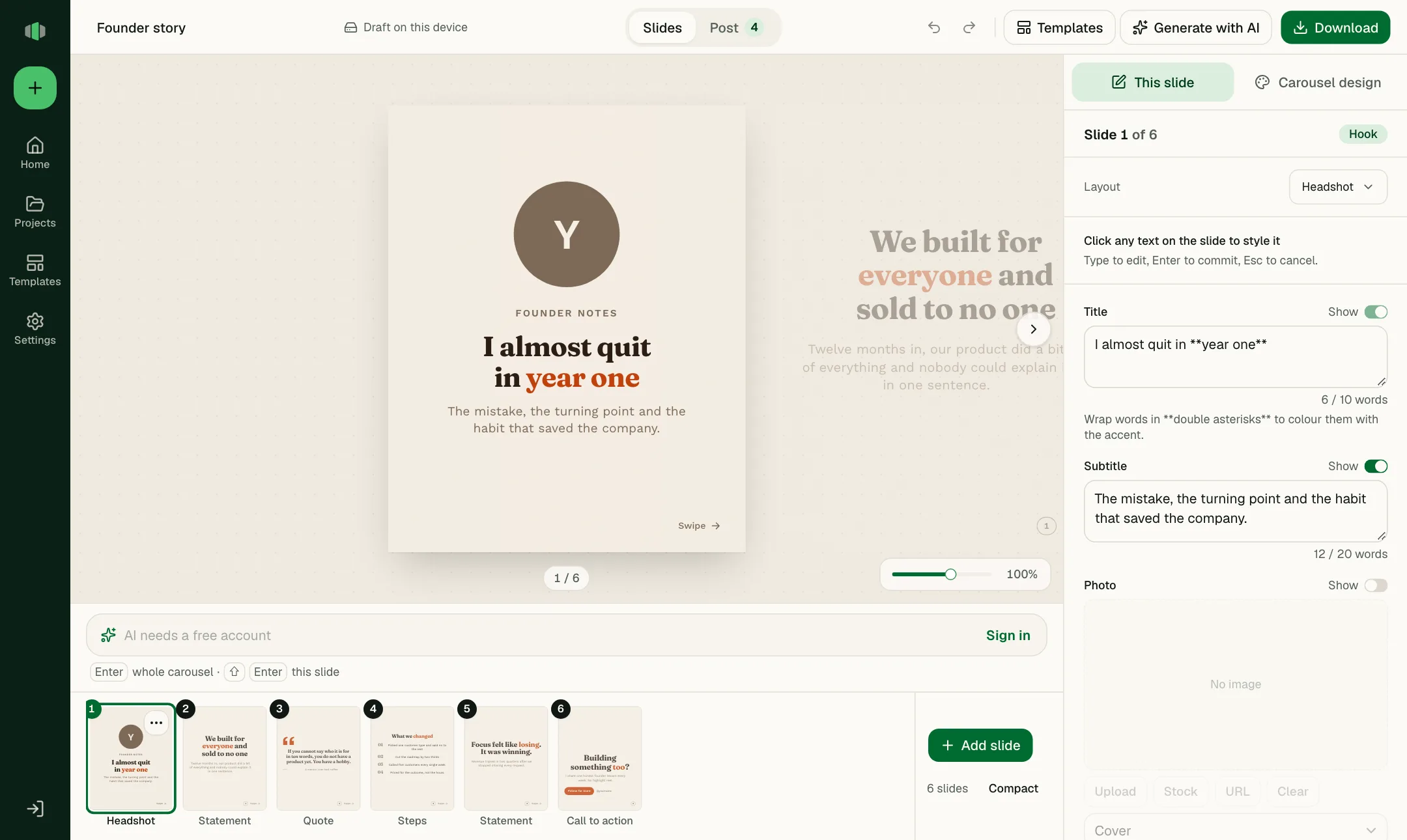
Edit directly on the slide
Click any line and retype it. The frame you see is the frame that exports.
Change the design
13 layouts per slide, including a free-form Canvas. 20 palettes and 12 font pairings for the whole carousel.
Add your identity
Your name, handle and photo go on the Hook and the Close, so every carousel reads as yours.
Keep the thread
The storyboard strip under the board shows every frame in order; drag to reorder, duplicate or change a layout.
Preview your carousel before you share it
See the post as LinkedIn will show it, on desktop and phone, light or dark. Run the checks, then download the PDF.
See the opening frame at feed size
The first frame is what stops the scroll. The preview shows it the size LinkedIn will, on desktop and on a phone, in light and dark.
Check the caption and its cut-off
LinkedIn shows the first lines and hides the rest behind “…more”. The preview marks where, so the hook lands before the fold.
Fix what the checks find
Empty fields, example text left in, titles that run long, colours that are hard to read. Each check names the slide and jumps to the field. None of them block the download.
Download the PDF, or PNGs
The PDF is what you attach to a LinkedIn document post. One PNG per slide for anywhere else.
- You download the file here and upload it to LinkedIn yourself. The feed preview approximates LinkedIn's layout; it is not a copy of it.
The data-story template as a document post
Desktop feed
Mobile feed
Saving this. Which one did you start with?
Start free. Create an account when you need more.
Everything below is free. There is no paid plan to compare against yet.
| What you get | As a guestNothing to sign up for. | With a free accountEmail and password, or Google. |
|---|---|---|
| Editor, 25 templates, blank start | ||
| Slides per carousel | Up to 20 | Up to 20 |
| PDF and PNG export | With a small watermark | No watermark |
| Saving | One draft in this browser | 10 carousels in the cloud |
| AI generations | 5 per month | |
| AI edits and captions | 30 per month | |
| API key for agents and scripts | 1 key, 100 requests a day | |
| Price | Free | Free. No card. |
| Try the editor | Create a free account |
Developers and AI agents use the same key over MCP or REST. Free keys export PDFs of up to 10 slides; the editor has no such limit. See the API and MCP docs.
Questions, answered
Short answers on cost, accounts, export and what LinkedIn needs. The guides go deeper.
Is LinkedIn Carousel Maker free?
Yes. The editor, templates and PDF export are free without an account. A free account removes the export watermark, saves up to 10 carousels in the cloud, and includes 5 AI generations and 30 AI edits or captions a month. There is no paid plan yet.
Do I need an account to create a carousel?
No. As a guest you get the full editor and one draft saved in this browser, and you can export with a small watermark. You need a free account for AI generation and for cloud save.
Can I edit slides generated by AI?
Yes. The AI writes ordinary slides, so you can retype any line on the slide, change a slide's layout, reorder slides, swap the palette and fonts, or ask the AI to rewrite one slide or the whole carousel.
Will my downloaded carousel have a watermark?
Exports made without an account carry a small watermark. With a free account, PDF and PNG exports have none.
How do I upload my carousel to LinkedIn?
Download the PDF, then start a LinkedIn post, choose the document option and attach the file. Add a title and your caption, then post. The how-to guide covers the whole process step by step.
What size should my LinkedIn carousel be?
Use 1080 × 1350 pixels (4:5 portrait) for the most room in the mobile feed, or 1080 × 1080 for a square. Both presets are built in. The size guide explains safe areas and PDF page size.
Is it only for LinkedIn?
Yes, on purpose. The two sizes, the feed preview, the caption cut-off, the document title and the limits are all tuned for LinkedIn document posts. Nothing here is a generic multi-platform template.
Do I have to use the AI?
No. Pick one of 25 templates or start from a blank frame, write every slide yourself, and export. Templates and blank starts cost no AI credit and work without an account.
Can I start from my own text or an article?
Yes. Give the AI a topic, paste your notes or a draft post, or add an article link. It pulls out the main points and writes one idea per slide in your material's voice.
Can my AI agent make carousels for me?
Yes. With a free account you get an API key for the MCP server and the REST API. Connect the server to Claude Code, Codex, Cursor or another MCP client, and the agent can generate, edit and export carousels into your projects. A free key exports PDFs of up to 10 slides; anything it makes also opens in the editor, where export has no such limit. A tested skill file teaches the agent the writing rules. See the developer docs.
How is my content stored and processed?
Without an account your draft stays in your own browser. With an account your carousels are saved to your account so you can open them on any device. When you use the AI, the topic, text or link you provide is sent to the AI model to write the slides. The privacy policy lists everything we store and who processes it.